
Frequently Asked Questions
Getting started
Is The Echo Chamber free?
Yes, completely free. There's no paid tier and no feature locked behind payment.
What permissions does The Echo Chamber need?
Four: View Channels, Send Messages, Embed Links and Attach Files (so pictures can appear in the Daily Echo). It needs no privileged intents, so it can't read your server's messages in the background.
Is there a web dashboard?
No. Everything happens inside Discord. Admins set the bot up with /config, and members find their way around with /help.
The commands don't show up in my server. What now?
Right after the bot joins, Discord can take a little while to show its commands — occasionally up to an hour. Restarting your Discord app often helps. If they still don't appear, check that the bot was invited with the invite link on this site (it includes the permission to create slash commands), and that your role is allowed to use application commands in that channel.
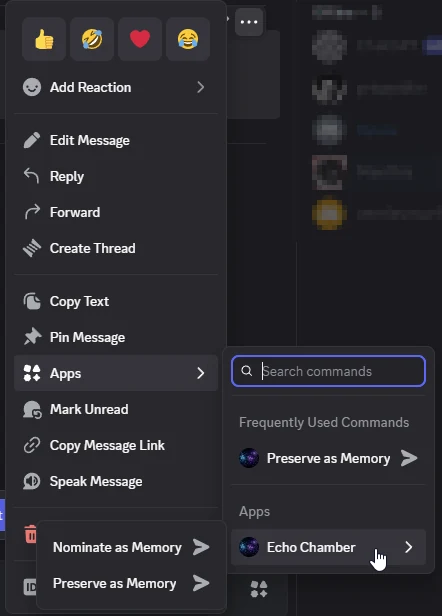
I can't find "Preserve as Memory" when I right-click a message.
It's two levels deep: right-click the message (on mobile, long-press it), choose Apps, then Echo Chamber, then Preserve as Memory or Nominate as Memory.
Does The Echo Chamber use AI?
No. Every story is written by a member of your community. Features like the Year in Echoes and the duplicate check are counted and compared, not generated by a model.
Memories & echoes
What's the difference between /remember and /nominate?
/remember puts a memory straight into the archive. /nominate proposes a moment and lets the community decide: it enters the archive once enough members echo it (5 by default). If your server uses moderator review, a moderator approves both first — a nomination goes up for echoes once it's approved.
What is an echo?
An echo is a member saying "I remember this". Everyone can echo a memory once, so the count shows how many different people share it. You can take your echo back at any time. Whoever preserves a public memory echoes it automatically — they were there, after all.
Is there a leaderboard?
No, on purpose. The archive is about the moments, not about who preserves the most of them.
Can I change a memory someone else preserved?
No — but you can add a recollection with your side of the story. The original story always stays as its author told it. Only the member who preserved a memory can edit it, and moderators can edit or remove public memories.
What happens if the original message is deleted?
The memory stays in the archive — it holds the story as the member wrote it, not a copy of the message. Its card simply says the original message has been deleted, instead of showing a broken link.
Someone already preserved the same moment. Now what?
After you save a memory, the bot checks for similar ones and privately offers to link them, or to fold yours into the existing memory (yours is removed and you echo theirs). You can always choose to keep both.
Can a memory have a picture?
Yes, one per memory: a JPEG, PNG, WebP or GIF up to 25 MB. Add it with /remember image: or /nominate image:, keep the picture from a message you preserve, or add, replace or remove it later with /memory-image.
I changed a memory's picture, but an old card still shows the old one.
That's expected. Cards already posted in a channel keep showing the picture they were sent with, just as they keep the old text after an edit. Bring the memory up again with /memory to see the new picture.
Who can see a private memory?
Only you — and the same goes for its picture. Private memories never show up for others in browsing or search, are never picked for the Daily Echo, and are left out of server exports.
Why is a memory number missing?
Each server numbers its memories #1, #2, #3… and numbers are never reused. When a memory is deleted, its number stays retired, so a link to "#7" can never suddenly point to a different memory.
Time capsules
Can moderators read a sealed time capsule?
No. Nobody can read a capsule through the bot before it opens — not its author and not the moderators. Server admins can open a community capsule early with /echo-admin capsule-open (for special occasions), but they can never open another member's letter to their future self.
When exactly does a capsule open?
At 12:00 on the opening date, in your server's timezone. Every message is revealed in the channel where the capsule was sealed, and everyone who contributed gets a ping.
My DMs are closed. Will I miss my letter to my future self?
No. If the bot can't DM you, it mentions you in the server instead — without revealing the letter — and you can read it any time with /capsule read.
The channel of a capsule was deleted. What happens when it opens?
The bot tries the Daily Echo channel next, then the server's system channel. If it can't post in any of them, it tells the contributors by DM that the capsule has opened.
Moderation
My memory says it's "waiting for a moderator".
Your server has moderator review switched on. Until a moderator decides, only you and the moderators can see it, and you get a DM either way. Once approved, it's posted where you submitted it (a nomination goes up for echoes). If it isn't approved, you can still find it in /my-memories.
Can moderators check memories before everyone sees them?
Yes. Switch on Moderator review in /config (page 👥 Members & moderation). New public memories and nominations, and changes to the title, story or picture of approved ones, then wait for a moderator. Pick a 📮 Moderators' channel to get each one posted there with ✅ Approve and 🙈 Hide buttons, or use /echo-admin queue.
Private memories and moderators' own memories skip review.
Can we limit who can add memories?
Yes. In /config, set Who can preserve & nominate to a role. Then only members with that role — and moderators — can use /remember, /nominate and the right-click actions. Everyone can still echo, add recollections and use time capsules.
I can't preserve or nominate anything.
Your server has limited preserving and nominating to a role you don't have. Ask a moderator. If the role was deleted, only moderators can add memories until an admin picks a new one in /config.
Daily Echo & settings
How is the Echo of the Day picked?
If a memory has its anniversary today, that one wins ("Exactly one year ago today…"). Otherwise the bot digs up a forgotten memory — one that few people echoed and that hasn't come up in a while.
The Daily Echo isn't being posted.
Open /config and check that a Daily Echo channel is set and the Daily Echo is switched On. Make sure the bot can view and send messages in that channel. Press 📣 Post one now to test it. Your archive also needs at least one public memory.
The Daily Echo is posted without its picture.
The bot needs the Attach Files permission in the Daily Echo channel to include a picture. Without it, the Daily Echo is still posted, just without the picture. Pictures always show in replies to commands and buttons.
Why are dates and times off by a few hours?
The server's timezone is UTC until an admin changes it. Set yours in /config with the 🕰️ Timezone button, which accepts any zone such as Europe/Amsterdam; the Daily Echo, anniversaries, memory dates and capsule openings all follow it. Times shown inside Discord messages always appear in each member's own timezone.
Privacy & data
Does the bot read or log our chat?
No. The bot only sees a message when a member right-clicks it and chooses to preserve or nominate it. It stores what members deliberately add to the archive, and nothing else. See the Privacy Policy for the full list.
Does the bot keep the location data in my photos?
No. Before a picture is saved, it's shrunk to at most 1920 pixels and re-encoded, which drops everything but the pixels: a phone photo's GPS location, camera details and so on never reach the database.
How do I delete my data?
Run /forget-me in the server. It removes the memories you preserved (with their pictures), your echoes, your recollections and your time capsule messages from that server's archive. Memories others preserved from your messages stay, but no longer name you as the author.
What happens to our archive if we remove the bot?
It's kept for 30 days, so re-inviting the bot restores everything. After that it's deleted automatically. Admins who want it gone right away can use /echo-admin delete-archive first.
Can we keep a copy of our archive?
Yes. Admins can download it with /echo-admin export as a standalone HTML timeline, Markdown or JSON; HTML and JSON include the pictures. Every member can export their own contributions with /my-memories export.
Where is our data stored?
On a secure server in the European Union. It's never sent to external third-party services — and since the bot uses no AI, nothing is sent to an AI provider either.
Is our archive shared with other servers?
No. Every server has its own separate archive, settings and numbering. Nothing from one server ever shows up in another.